
Kustomize is a Kubernetes-native configuration management tool that allows you to customize Kubernetes YAML manifests without modifying the original files. It’s built into kubectl (since version 1.14) and is widely used for managing configurations across multiple environments like dev, staging, and production.Here’s an overview of Kustomize and its features:
Key Features of Kustomize
1. Layered Configuration
Kustomize follows a layered approach to configuration management:
- Base: This is the core set of resource definitions that can be reused across different environments.
- Overlays: These are environment-specific customizations that can override or add to the base configuration. For example, you can have separate overlays for development, staging, and production environments.
2. No Templating
Unlike some other tools, Kustomize does not use templating. Instead, it relies on a declarative approach:
- Users define their configurations in plain YAML files.
- Kustomize applies transformations based on the
kustomization.yamlfile without altering the original resource files.
3. Resource Customization
Kustomize allows for various types of customization:
- Patching: You can apply patches to existing resource definitions to modify specific fields.
- ConfigMap and Secret Generation: Kustomize can generate ConfigMaps and Secrets from files or literals, making it easy to manage sensitive information.
- Name and Label Management: You can rename resources and add common labels across multiple resources easily.
4. Built-in Transformations
Kustomize includes several built-in transformations to simplify configuration management:
- Image Tagging: Easily change the image tags for your deployments.
- Namespace Management: Specify the namespace for your resources without modifying the original files.
How to Use Kustomize
Basic Workflow
- Create a Base Directory: Start by creating a directory that contains your base resource files (e.g., Deployment, Service).
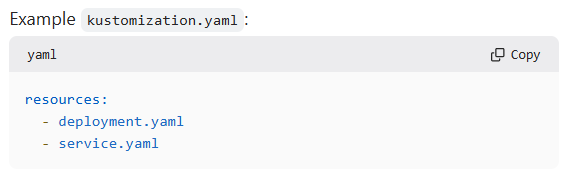
- Define a
kustomization.yamlFile: In the base directory, create akustomization.yamlfile that lists the resources and any customization options.
- Create Overlays: For each environment, create an overlay directory with its own
kustomization.yamlfile that references the base configuration and applies any necessary customizations. - Build and Apply: Use the
kustomize buildcommand to generate the final YAML output, which can then be applied to your Kubernetes cluster usingkubectl apply.
Example Structure
Copymy-k8s-app/
├── base/
│   ├── deployment.yaml
│   ├── service.yaml
│   └── kustomization.yaml
└── overlays/
    ├── development/
    │   └── kustomization.yaml
    └── production/
        └── kustomization.yaml
Advantages of Using Kustomize
- Simplicity: Kustomize provides a straightforward way to manage configurations without complex templating logic.
- Reusability: Base configurations can be reused across multiple environments, reducing duplication and errors.
- Version Control: Since Kustomize uses plain YAML files, it integrates seamlessly with version control systems, making it easy to track changes.
Conclusion
Kustomize is an essential tool for Kubernetes users looking to manage their configurations effectively. Its declarative approach, combined with powerful customization features, makes it a valuable asset for maintaining consistent and reliable deployments across different environments. By leveraging Kustomize, teams can enhance their workflow and improve the overall management of Kubernetes resources.