
I recently encountered an issue with AWS Key Management Services (KMS) regarding the deletion of key Management services. Unfortunately, I was unable to schedule the deletion because I had deleted the IAM account before removing the KMS and other associated services. This resulted in a MalformedPolicyDocumentException error.


Error Explanation
The error arises because the KMS key policy references deleted IAM entities (users/roles) through their unique IDs (e.g., AIDAVU5W7NFFEVUH4DX62). When these IAM entities are deleted, their ARNs in key policies are converted to unique IDs, leading to issues since those entities no longer exist.
Steps to Resolve the Issue
After detailed research and support assistance, I was advised to follow these steps:
- Create IAM Users for Recovery:
- For each affected key, create an IAM user using the naming convention:
kms_key_recovery_<KEY_ID> - For example, if the Key ID is
2diw934ba0-937e-42dd-8bf0-0bfa1fb72je11, the corresponding recovery user would be:kms_key_recovery_2diw934ba0-937e-42dd-8bf0-0bfa1fb72je11 - Attach the following policy to the newly created users:
{ "Version": "2012-10-17", "Statement": [ { "Effect": "Allow", "Action": [ "kms:ListAliases" ], "Resource": "*" } ] }
- For each affected key, create an IAM user using the naming convention:
- Update the Key Policy:
- Review and remove any orphaned unique IDs from the key policy.
- Ensure all principals specified in the policy currently exist in my AWS account.
- Add valid ARNs for current IAM users/roles who need access.
- Include Required Permissions:
- Add the
kms:ScheduleKeyDeletionaction to the policy for the recovery user to enable the intended key deletion functionality.
- Add the
Example of a Valid Policy Structure
Here is an example of how the policy structure should look:
Copy{
  "Version": "2012-10-17",
  "Statement": [
    {
      "Sid": "KeyAdministration",
      "Effect": "Allow",
      "Principal": {
        "AWS": "arn:aws:iam::YOUR-ACCOUNT-ID:user/ValidUserName"
      },
      "Action": [
        "kms:Update*",
        "kms:ScheduleKeyDeletion"
        // other required permissions
      ],
      "Resource": "*"
    }
  ]
}
All the username looked like given below picture: kms_key_recovery_<KEY_ID>= ARN

After That,
- 1. Review and Update Key Policy:
- – Remove any orphaned unique IDs from the key policy
- – Ensure all principals specified in the policy currently exist in your AWS account
- – Add valid ARNs for current IAM users/roles who need access
- 2. Include Required Permissions:
- – Add the “kms:ScheduleKeyDeletion” action to your policy for the recovery user
- – This will enable the intended key deletion functionality
Example of a Valid Policy Structure:
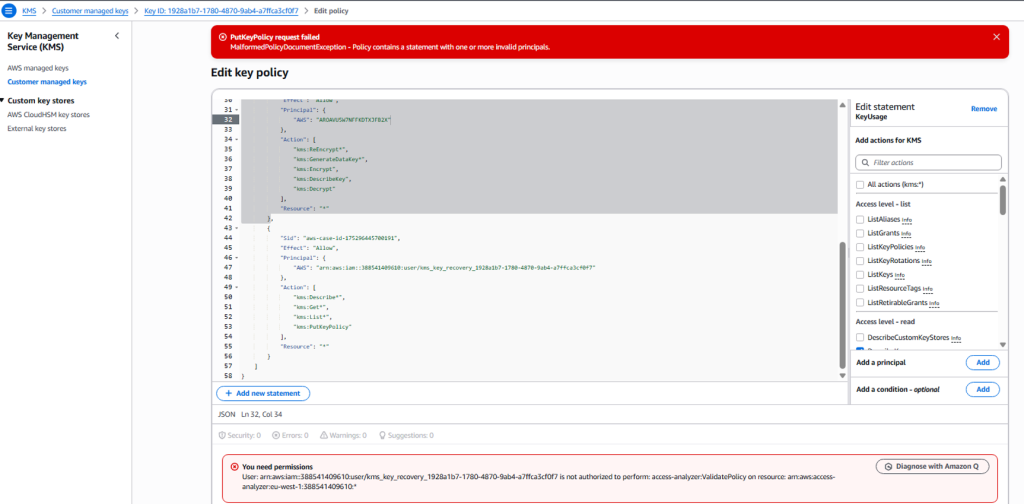
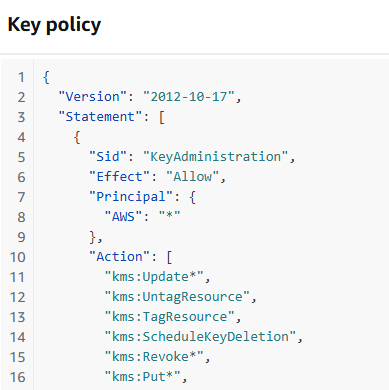
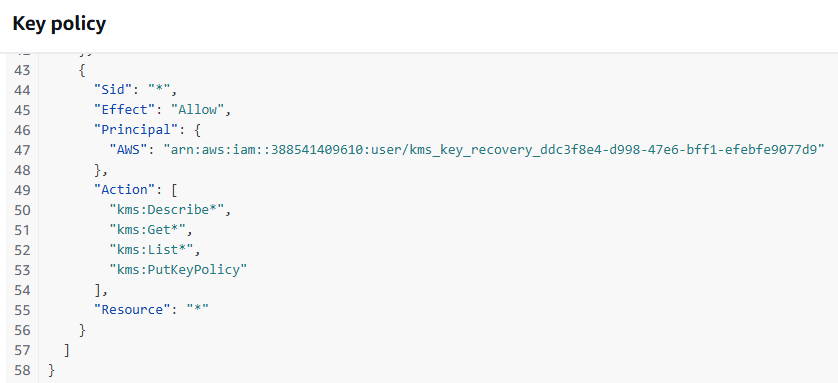
After editing the key policy and removing the unique ID, i was able to schedule the deletion.
For detailed guidance on KMS key policies and resolving principal-related errors, please refer to: https://repost.aws/knowledge-center/kms-policy-error-invalid-principals